OKX Wallet Login: Open, Restore and Reset Your Wallet
Published November 8, 2026 · okxapk
Self-custody wallet for 140+ networks, with a built-in DEX. Joining through our invite link gives a trading-fee discount on OKX DEX swaps.
Open OKX WalletReferral link: we may earn a share of DEX fees at no extra cost to you.
OKX Wallet has no username or account login: you open it with the wallet password set on that device, or with the social login you chose when creating it. On a new phone or browser, you "log in" by importing your wallet again with its 12-word seed phrase, private key or cloud backup. OKX does not store your wallet password, seed phrase or private key, so if you forget the password, the only fix is to reset the wallet and re-import it from your backup.
Many people confuse the two. Your OKX account (the exchange) uses an email or phone and a login password, and can be recovered through OKX support. OKX Wallet is self-custody: the wallet password only unlocks the wallet on one device, and the seed phrase is what really controls your funds. Forgetting your exchange password is fixable; losing your wallet's seed phrase is not.
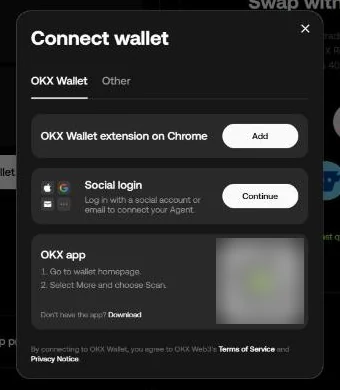
If the restored wallet is not the one you expected, OKX notes you may have imported a different seed phrase, or the phrase was created in another wallet app.
OKX's help center is clear: the wallet password cannot be retrieved, and OKX cannot reset it for you. You can only reset the wallet and re-import it:
If you have no backup of the seed phrase or private key, OKX says the wallet and its assets cannot be recovered. Back up before you ever need it: in the wallet, open wallet management, pick the wallet and choose Seed phrase or Cloud backup.
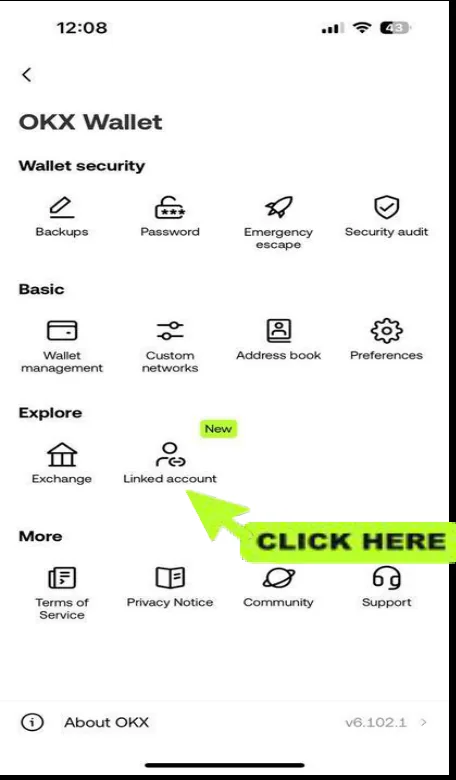
New to OKX Wallet? You can start through our OKX Wallet referral link (we may earn a commission; any DEX fee discount depends on the code and is shown before you bind it).
Not a traditional one. You unlock it with a wallet password on each device, or with your social login. On a new device you import the wallet with your seed phrase, private key or cloud backup.
No. OKX does not store your wallet password, seed phrase or private key. You can only reset the wallet and re-import it from your backup.
Wallets created in OKX Wallet use a 12-word seed phrase. Back up all 12 words in the correct order.
OKX says the entry may have moved to Services → OKX Wallet or to the standalone OKX Wallet app, depending on region and app version. Update the app first, and contact support without ever sharing your seed phrase.
Self-custody wallet for 140+ networks, with a built-in DEX. Joining through our invite link gives a trading-fee discount on OKX DEX swaps.
Open OKX WalletReferral link: we may earn a share of DEX fees at no extra cost to you.