OKX Wallet Referral Code: How DEX Fee Discounts Work
Published November 7, 2026 · okxapk
Self-custody wallet for 140+ networks, with a built-in DEX. Joining through our invite link gives a trading-fee discount on OKX DEX swaps.
Open OKX WalletReferral link: we may earn a share of DEX fees at no extra cost to you.
An OKX Wallet referral code links your wallet to the person who invited you on OKX DEX, and can give you a trading fee discount of 0% to 10% on your swaps. The person who creates the code picks the discount when they make it, and it cannot be changed later. You bind a code by opening an invite link and signing with your wallet, or by entering the code in the Referral Center. Once bound on a device, the code cannot be changed, so check it before you sign.
According to OKX's DEX Referral FAQ:
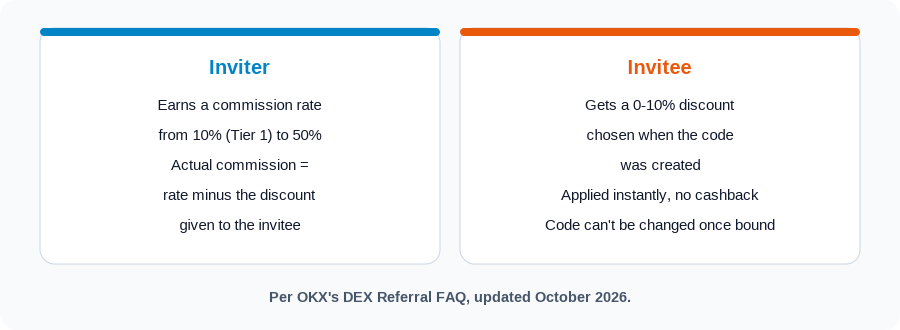
This is the part most "referral code" pages leave out. The inviter's own commission equals their total rate minus the discount they give you. A code with a 10% discount gives a Tier 1 inviter nothing, so many codes offer less. OKX shows the discount on the invite page before you bind, so you can see exactly what a code gives.

No. OKX says a code bound to a wallet on a device cannot be modified or changed. Since app version 6.152.0, binding on the app also applies to all new wallets added on that device. If you import a previously bound wallet on a new device, the binding syncs. So make sure you are happy with the code before you sign.
OKX lists violations that lead to permanent blacklisting, including self-referral (inviting your own wallets) and offline cashback deals. If violations are detected, a referral code may be frozen and stop earning. Be wary of anyone promising extra rebates for using their code outside the official program.
On the web, open the Referral dashboard and connect an OKX seed phrase wallet; in the app, go to Home → More → Explore → Referral. Tap Create code, choose 5–15 letters or numbers and set the invitee discount. Each wallet can create up to 100 codes, codes cannot be edited or deleted, and only seed phrase wallets can create them.
If you want to join OKX DEX through us, here is our OKX Wallet referral link. It is a referral link: we may earn a commission at no extra cost to you. Our code OKAPPAPK gives a 5% discount on OKX DEX service fees, and the invite page shows this before you bind it.
Between 0% and 10% off OKX DEX trading fees, set by whoever created the code. The invite page shows the discount before you bind it.
No. Once a code is bound to a wallet on a device, it cannot be changed, and since app version 6.152.0 new wallets on that device inherit it.
No. OKX lists self-referral as a violation that can lead to permanent blacklisting.
No. OKX applies the discount in real time by charging the lower fee when you place the order; there is no cashback afterwards.
Self-custody wallet for 140+ networks, with a built-in DEX. Joining through our invite link gives a trading-fee discount on OKX DEX swaps.
Open OKX WalletReferral link: we may earn a share of DEX fees at no extra cost to you.