Referral link: we may earn a share of DEX fees at no extra cost to you.
The OKX NFT Marketplace is the NFT section of OKX Wallet (web3.okx.com): you buy, sell and list NFTs straight from your self-custody wallet, and OKX says it charges no service fee. You may still pay creator royalties, fees on other marketplaces, and network gas. OKX lists support for Bitcoin, Ethereum, Solana, Polygon, BNB Chain, Arbitrum, Optimism, Base, zkSync Era, Avalanche, Immutable zkEVM, TON, Sui and more, and it pulls in listings from other marketplaces such as OpenSea and Magic Eden.
What you can do on OKX NFT
NFT Market: search collections by category and buy, including several NFTs at once. OKX says it shows listings from other marketplaces in real time, so one search covers more than its own listings.
Collection order book: on a collection page, open the Order book, choose an order type and enter how many NFTs you want to buy or sell.
Launchpad: NFT project launches run with OKX.
Rankings: collection rankings under Web3 Wallet, NFT Marketplace, Rankings.
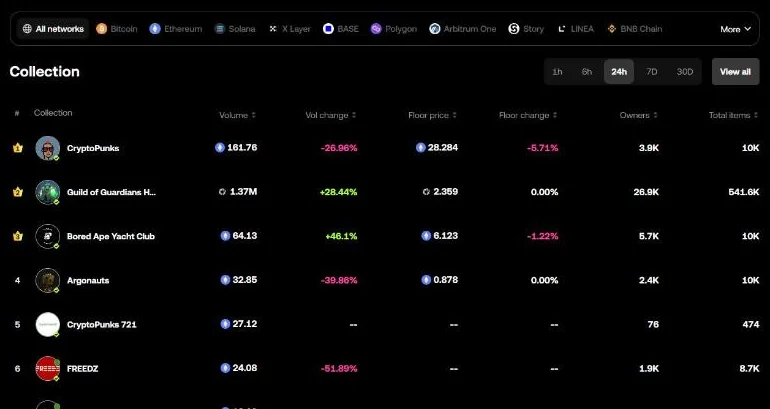
The OKX NFT marketplace: filter collections by network and sort by volume or floor price. Screenshot of web3.okx.com, 31 October 2026.
What it costs
Fee
On OKX NFT
OKX service fee
None, according to OKX's NFT FAQ
Creator royalty
May apply, depending on the collection
Other marketplace fee
May apply if the listing comes from another platform
Gas
Paid when you buy, list, sell, transfer or cancel, in the network's native token
On a cheap NFT, gas can be more than the item itself. Check the total on the confirmation screen, not only the listed price.
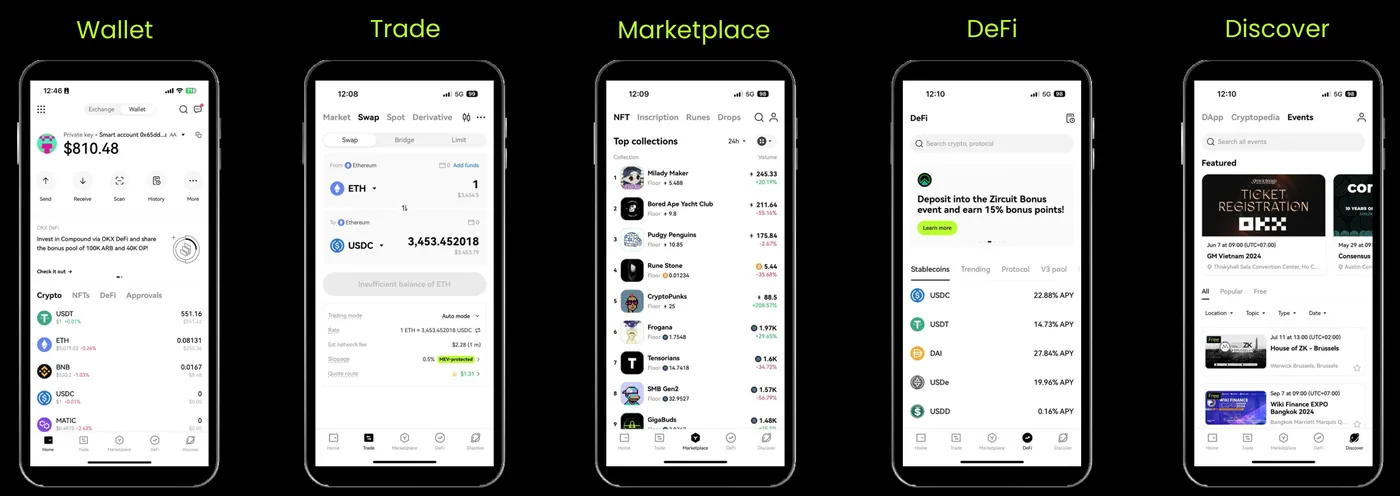
The Marketplace tab is where NFTs live inside OKX Wallet. Source: OKX affiliate guide, 2024 app version; the current app may look different.
How to buy an NFT
Open OKX Wallet and fund it with the network's token (for example ETH on Ethereum or SOL on Solana), plus extra for gas.
Go to the Marketplace (NFT) section and search for the collection.
Check the contract address on the NFT's detail page. Copycat collections often use the same name and images.
Buy at the listed price, or make an offer.
Review the total and sign. Your NFT shows under your profile, My NFTs.
Offers and listings: rules worth knowing
Offers need an expiry: 1, 3, 7, 30 or 180 days, or a custom date up to six months. An unfilled offer expires on its own.
Listing an NFT or placing a bid asks you to approve the matching transaction request.
You can place several offers at the same price on different NFTs of a collection; once one fills, OKX cancels the others.
OKX supports buying or selling part of an ERC-1155 token supply, so you do not have to take every copy.
Some collections have their own rules. For CryptoPunks, only one offer can stand at a time and you deposit funds to make it.
Common problems
"Unable to estimate network fee" when accepting an offer: the seller pays gas to accept an offer or cancel a listing. Top up the wallet and try again.
"Third-party contract execution failed" when buying: the project may allow only whitelisted addresses. Ask the project whether your address qualifies.
NFT not showing: you may have hidden it. Open NFTs, Manage NFTs, Display settings, and untick the option that hides NFTs you hid.
Stay safe with NFTs
Anyone can deploy a collection on-chain, and OKX notes the marketplace lists collections with normal trading activity. A listing is not an endorsement.
Ignore NFTs that show up uninvited with a link to "claim" something. That is a common way to get you to sign a malicious approval.
Revoke marketplace approvals you no longer use.
NFT prices are volatile and many collections lose most of their value.
Need a wallet first? You can create OKX Wallet through our OKX Wallet referral link (we may earn a commission; any DEX fee discount depends on the code and is shown before you bind it).
FAQ
Does OKX charge fees on NFTs?
OKX says its NFT marketplace charges no service fee. Creator royalties, other platforms' fees and network gas can still apply.
Which blockchains does OKX NFT support?
OKX lists Bitcoin, Ethereum, Polygon, Solana, BNB Chain, Arbitrum, Optimism, Base, zkSync Era, Avalanche, Immutable zkEVM, TON and Sui among others. Support can differ by network and feature.
Where do I see my NFTs in OKX Wallet?
On the wallet home page, tap More, NFTs, then the profile icon at the top right and My NFTs.
How do I report a scam NFT collection?
Contact OKX support. Remember that anyone can create a collection, so always check the contract address before buying.