OKX Wallet to Exchange: Send Crypto Without Losing It
Published October 22, 2026 · okxapk
Self-custody wallet for 140+ networks, with a built-in DEX. Joining through our invite link gives a trading-fee discount on OKX DEX swaps.
Open OKX WalletReferral link: we may earn a share of DEX fees at no extra cost to you.
To move crypto from OKX Wallet to an exchange, copy the exchange's deposit address for that exact coin and network, send from the wallet on the same network, and keep enough of the network's native token to pay gas. Almost every lost or stuck transfer comes from one of three mistakes: the wrong network, too little gas, or sending a token the receiving exchange does not support.
| Check | Why it matters |
|---|---|
| Same network on both sides | OKX warns that some addresses look identical across networks, but balances are not shared between networks. Sending on the wrong network can mean the funds never show up. |
| Enough native token for gas | Gas is paid in the network's own coin (ETH on Ethereum, BNB on BNB Chain, SOL on Solana). Without it, the transfer fails. |
| The exchange supports the token | If the receiving platform does not support the asset, it may not credit it. |
The same steps work for any other exchange: always take the deposit address from the exchange itself, for the exact network you will use.
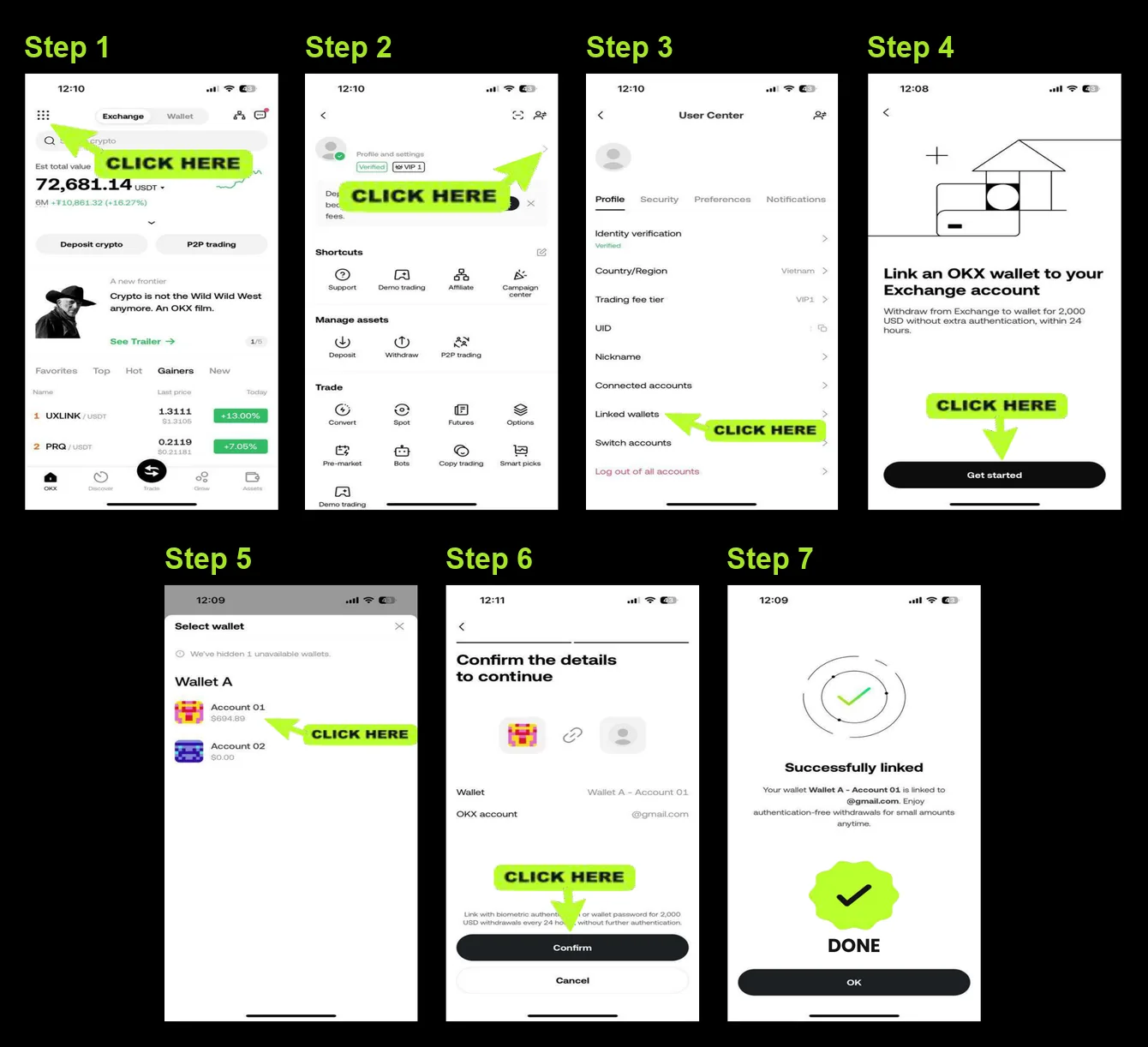
Faster option inside OKX: Wallet Connect. If your OKX exchange main account is verified and you are in a supported region, you can connect OKX Wallet to it and move up to 10,000 USD a day between the two without extra verification. Each exchange account can connect up to 10 wallets (OKX help center, updated August 2026).
OKX's help center lists the usual causes:
A pending transaction has not been confirmed on the blockchain yet, usually because the gas fee was below the network's current level. Look up the transaction hash on a block explorer and wait. Next time, choose a higher gas fee or set one manually.
If you need to move an asset to a different network first, use a cross-chain bridge before sending, as OKX's help center recommends.
If you need to swap a token before moving it, OKX Wallet's built-in DEX can do it. Joining OKX Wallet through an invite link can give a 0–10% discount on DEX trading fees, depending on the code. Our OKX Wallet invite link is a referral link: we may earn part of the fee at no extra cost to you.
It depends on the network and the exchange's required confirmations. Check the transaction on a block explorer; once it is confirmed, the exchange credits it after its own confirmation count.
No. Blockchain transfers cannot be reversed once confirmed. That is why a small test transfer is worth it.
Not always. If the exchange controls the same address on that network, its support team may be able to help. Contact the receiving exchange with the transaction hash.
Gas on Ethereum is paid in ETH, whatever token you send. The same applies to other networks and their native coins.
Use the same steps as above. In Binance, choose Deposit, pick the coin and network, and copy that address. In OKX Wallet, choose Send on the same network, paste the address, and send a small test amount first. Only send assets and networks the receiving exchange supports.
Self-custody wallet for 140+ networks, with a built-in DEX. Joining through our invite link gives a trading-fee discount on OKX DEX swaps.
Open OKX WalletReferral link: we may earn a share of DEX fees at no extra cost to you.