OKX Wallet Settings: A Security Setup Checklist
Published October 27, 2026 · okxapk
Self-custody wallet for 140+ networks, with a built-in DEX. Joining through our invite link gives a trading-fee discount on OKX DEX swaps.
Open OKX WalletReferral link: we may earn a share of DEX fees at no extra cost to you.
Most OKX Wallet settings live in the main menu at the top left of the app. The ones that matter for safety are the authentication method (password or biometrics), the address book, hiding risky transactions, and being careful with custom networks. This checklist walks through each setting OKX documents, in the order worth doing.
Forgot the password? You can reset it and re-import the wallet with your seed phrase or private key to set a new one. That only works if your backup is safe, so check your seed phrase backup now.
From the menu you can create a wallet, import one, connect a hardware wallet, add a watch-only wallet, remove wallets and rename wallets or accounts. Before removing any wallet, make sure its seed phrase or private key is backed up; removing it without a backup can mean losing the funds for good.
When sending, pick the saved address from the address book option. It only appears when the selected network matches the saved address's network, which also helps you avoid sending on the wrong network.
You must find these details yourself, and OKX advises entering accurate information. Only use network details from the project's official documentation; a fake RPC can show wrong balances or track your activity.
| Setting | What it does |
|---|---|
| Hide risky transactions in history | Hides risky and small transactions, which often come from address-poisoning spam |
| Hide low-value assets | Hides assets valued between 0.1 and 10,000 USDT across all crypto in the app wallet |
| Set value threshold | Assets below the threshold count as low-value and are excluded from the total |
| Count NFTs in total balance | Includes or excludes NFT valuations |
| Interaction settings | Haptic feedback and screenshot sharing |
| Language, currency, appearance, colours | Interface language, quote currency (e.g. USD), dark/light mode, rise/fall colours |
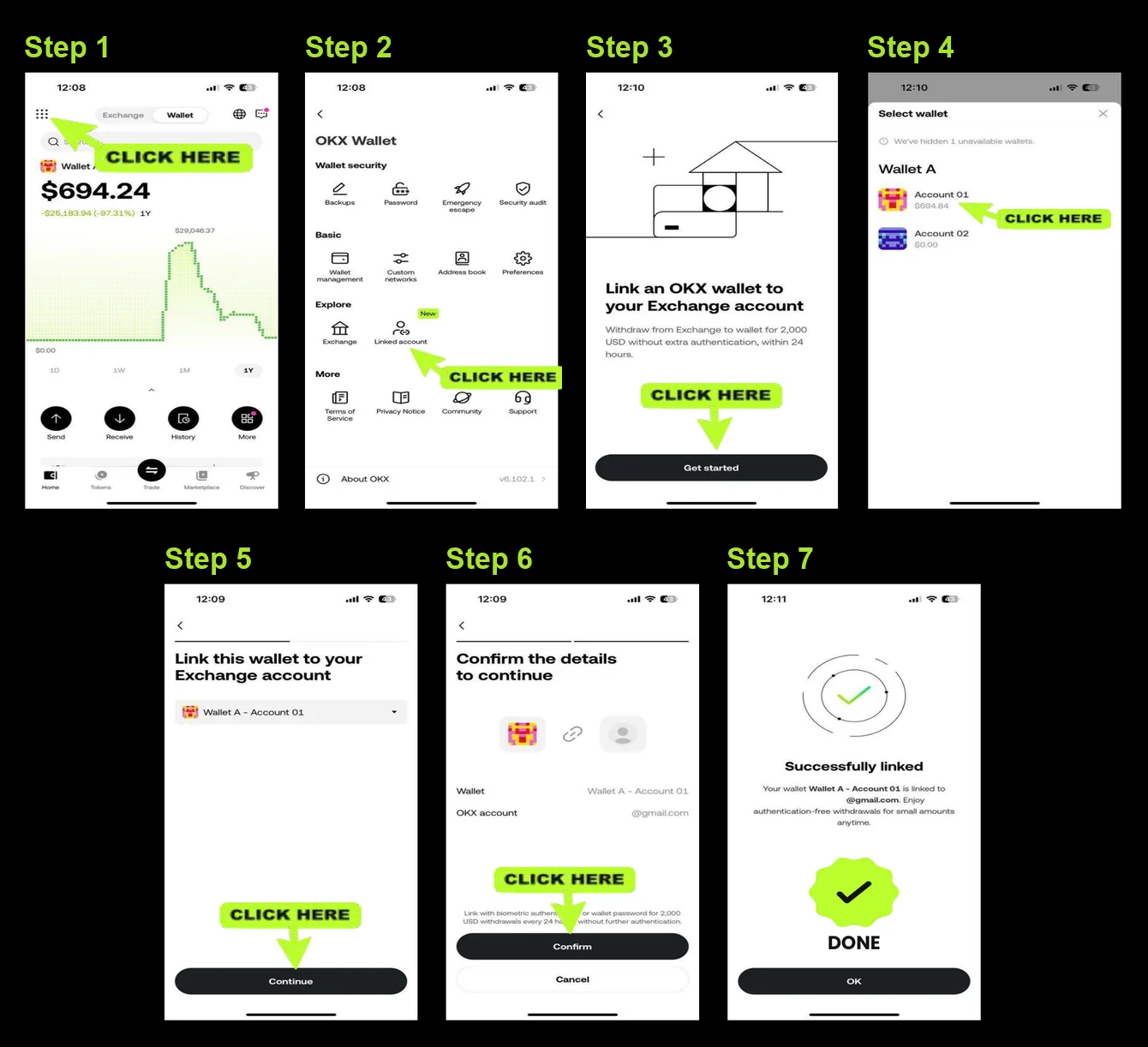
This setting links OKX Wallet to your OKX exchange account. While you are logged in to the exchange, you can withdraw up to 10,000 USD within 24 hours without extra verification. It is not supported in the OKX Wallet app. Only turn it on if you need it.
Setting up a fresh wallet? You can create OKX Wallet through our OKX Wallet invite link (referral link), which gives a 0–10% DEX trading fee discount depending on the code.
Set the authentication method to Password first, then use Change Password with your current password.
Reset it and re-import your wallet with the seed phrase or private key to set a new password.
Custom networks are supported for EVM-compatible chains only, using details you enter yourself.
The "Hide risky transactions in history" setting hides risky and small transactions.
Self-custody wallet for 140+ networks, with a built-in DEX. Joining through our invite link gives a trading-fee discount on OKX DEX swaps.
Open OKX WalletReferral link: we may earn a share of DEX fees at no extra cost to you.