OKX DEX Swap: How It Works, Fees and Invite Discount
Published October 23, 2026 · okxapk
Self-custody wallet for 140+ networks, with a built-in DEX. Joining through our invite link gives a trading-fee discount on OKX DEX swaps.
Open OKX WalletReferral link: we may earn a share of DEX fees at no extra cost to you.
OKX DEX is a decentralized exchange aggregator built into OKX Wallet: instead of trading on one exchange, it compares quotes from 400+ DEXs across 30+ networks and routes your swap to get a better price. You swap straight from your own wallet, pay the network fee and any service fee shown on the confirmation screen, and can get a 0–10% trading fee discount if you joined through an invite code.
OKX calls its routing engine X Routing. For each swap it compares liquidity pools, can split your order across several of them, and weighs fees and slippage to find a better overall result. The DEX page has three tabs:
| Cost | What we know |
|---|---|
| Network (gas) fee | Paid in the network's native token on every swap. OKX recommends using the default fee values. |
| Service fee | Shown on the swap confirmation. OKX's referral FAQ notes that some token trades carry no UI service fee. A third-party news report put fees at 0% for stablecoin swaps, 0.25% for mainstream tokens and 0.85% for most others; OKX has not published this table in its help center, so always read the fee on the confirmation screen. |
| Slippage | The difference between the expected and executed price; depends on liquidity and your tolerance setting. |
| Invite discount | 0–10% off trading fees if you joined with an invite code, applied in real time. |
Not set up yet? You can create OKX Wallet through our OKX Wallet invite link (referral link), which gives a 0–10% DEX trading fee discount depending on the code.
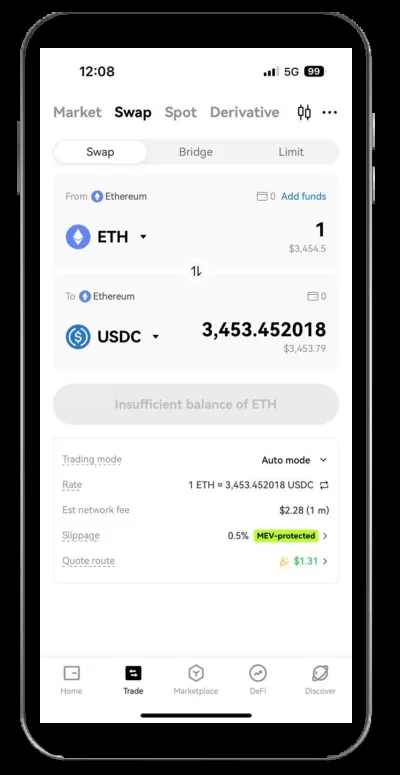
Under OKX's DEX referral program, the person who creates an invite code chooses a fee discount for invitees between 0% and 10%. The discount is deducted in real time on each trade, not paid back later. You bind a code by opening the invite link and signing with your wallet, or by entering the code in the Referral Center. The program also prohibits self-referral and offline cashback deals.
No. OKX DEX swaps run on-chain from your own self-custody wallet; the exchange is a custodial account.
The exact service fee is shown on the confirmation screen and can be zero for some tokens. Network gas fees are separate.
Use the Bridge tab to move assets between networks before or after swapping.
Yes, once a code is bound to your wallet the discount is deducted in real time on eligible trades.
Self-custody wallet for 140+ networks, with a built-in DEX. Joining through our invite link gives a trading-fee discount on OKX DEX swaps.
Open OKX WalletReferral link: we may earn a share of DEX fees at no extra cost to you.