Is OKX Wallet a Hot Wallet? How to Add a Hardware Wallet
Published October 29, 2026 · okxapk
Self-custody wallet for 140+ networks, with a built-in DEX. Joining through our invite link gives a trading-fee discount on OKX DEX swaps.
Open OKX WalletReferral link: we may earn a share of DEX fees at no extra cost to you.
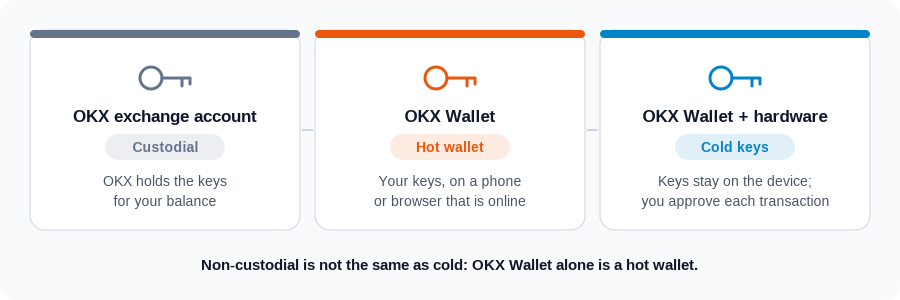
Yes, OKX Wallet on its own is a hot wallet: it is non-custodial software on your phone or browser, and your keys sit on a device that is connected to the internet. If you want cold-storage protection, you can connect a hardware wallet such as Keystone or OneKey to OKX Wallet. The private keys then stay on the hardware device, and every transaction has to be approved on it.
| What | Hot or cold? | Who holds the keys |
|---|---|---|
| Your OKX exchange account | Managed by OKX, not by you | OKX (custodial) |
| OKX Wallet (app or extension) | Hot: software on an online device | You (seed phrase or private key) |
| OKX Wallet + hardware wallet | Cold keys, hot interface | You, on the hardware device |
OKX's own wallet types guide puts browser plug-in wallets in the hot category and points to hardware wallets for cold storage. Being non-custodial is not the same as being cold: OKX Wallet is non-custodial, but your keys are still on an online phone or computer.
A hot wallet is quick. You can swap, sign and connect to dApps in seconds, and OKX Wallet adds its own checks, which we cover in Is OKX Wallet safe?. The trade-off is exposure. Malware, a fake extension or a phishing signature can reach a device that is always online.
A common setup is to keep a small trading balance in the hot wallet and keep long-term holdings behind a hardware wallet.
When you create or import a wallet in the OKX Wallet extension, OKX lists Hardware wallet as an option next to seed phrase and private key (OKX help center, updated October 2026). Two brands have step-by-step official guides:
For other devices, open the Hardware wallet screen in your version of OKX Wallet and check the list there. We did not find an official OKX step-by-step guide for other brands, so we do not describe one here.
This is a different feature. When you deposit from, or withdraw to, a private wallet, OKX may need to confirm the wallet is yours under travel rule regulations. It calls this Hardware Wallet Verification. The key points from its FAQ (published September 2026):
Anyone who asks for your recovery phrase "to verify your wallet" is a scammer. See common OKX scams.
When you do trade from either wallet, joining OKX Wallet through an invite link can give a 0–10% discount on DEX trading fees, depending on the code. Our OKX Wallet invite link is a referral link: we may earn part of the fee at no extra cost to you.
On its own it is a hot wallet: non-custodial software running on an internet-connected phone or browser. Connected to a hardware wallet, the keys stay offline on the device.
Your exchange balance is held by OKX, so how it is stored is up to OKX, not you. For cold storage you control, connect a hardware wallet such as Keystone or OneKey to OKX Wallet.
Yes, on supported networks. OKX lists send, receive and swap for Keystone, and you approve each transaction on the device.
OneKey says the Passphrase (hidden wallet) feature must be off. Also check the connection type: USB for the extension, Bluetooth for the app.
No. Verification only needs a signature on the device. OKX says it will never ask for your recovery phrase or PIN.
Self-custody wallet for 140+ networks, with a built-in DEX. Joining through our invite link gives a trading-fee discount on OKX DEX swaps.
Open OKX WalletReferral link: we may earn a share of DEX fees at no extra cost to you.