How to Revoke Token Approvals in OKX Wallet (Step by Step)
Published October 28, 2026 · okxapk
Self-custody wallet for 140+ networks, with a built-in DEX. Joining through our invite link gives a trading-fee discount on OKX DEX swaps.
Open OKX WalletReferral link: we may earn a share of DEX fees at no extra cost to you.
To revoke a token approval in OKX Wallet, open the wallet homepage, tap Approvals, pick the approval you no longer trust and cancel it, then confirm the transaction. Revoking is an on-chain transaction, so you need a little of the network's native token for gas. Do it for any site you don't recognise, and for unlimited approvals you no longer use.
When you swap on a DEX or list an NFT, the app first asks you to approve a smart contract to spend a token from your wallet. That permission stays in place after the swap is done.
OKX's DEX FAQ puts the risk plainly: an unlimited approval gives the contract ongoing permission to spend your tokens without asking again, and if that contract (or an upgrade of it) is compromised or malicious, it could transfer your balance. OKX's advice is to use unlimited approvals only with trusted protocols and to revoke unused ones regularly.
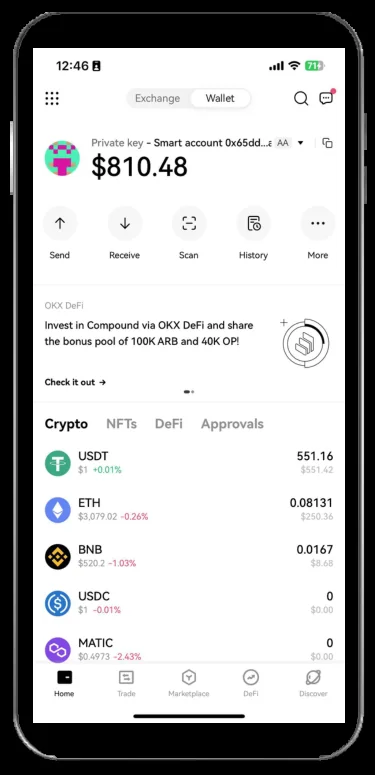
OKX warns that attackers use approval operations to charge abnormally high gas fees, and that phishing contracts appear from time to time. Before you start or cancel an approval, look at the estimated gas on the confirmation page. If it is far above what a normal transfer on that network costs, stop.
Disconnecting a site from your wallet only stops it seeing your address in that browser session. An approval you signed earlier is recorded on the blockchain and keeps working until you revoke it. If you are worried about a site, revoke its approvals, not just the connection.
| When | What to do |
|---|---|
| After trying a new dApp | Revoke its approval if you won't use it again. |
| Every month or so | Open Approvals and clear anything you don't recognise. |
| When you see a risk pop-up | Open the flagged approval and cancel it. |
| Before each approval | Approve a limited amount where the app allows it, and check the site address. |
For the wider picture, read is OKX Wallet safe and our list of common OKX scams. If you are new to OKX Wallet, you can set it up through our OKX Wallet invite link (referral link), which gives a 0–10% trading-fee discount on DEX swaps depending on the code.
Yes. A revoke is an on-chain transaction, so you pay the network fee in that network's native token, for example ETH on Ethereum or BNB on BNB Chain.
On the wallet homepage. OKX's help center says you can revoke token approvals by tapping Approvals there.
No. Revoking only stops the contract from spending more. Tokens that have already left your wallet can't be recalled this way.
OKX's older guides point to a token approval checker in OKX Explorer, but that page returned "not found" when we checked on 17 October 2026. Use the Approvals tab in the wallet instead.
Self-custody wallet for 140+ networks, with a built-in DEX. Joining through our invite link gives a trading-fee discount on OKX DEX swaps.
Open OKX WalletReferral link: we may earn a share of DEX fees at no extra cost to you.