OKX Exchange to Web3 Wallet: How to Move Your Crypto
Published October 29, 2026 · okxapk
Self-custody wallet for 140+ networks, with a built-in DEX. Joining through our invite link gives a trading-fee discount on OKX DEX swaps.
Open OKX WalletReferral link: we may earn a share of DEX fees at no extra cost to you.
To move crypto from the OKX exchange to your OKX Web3 wallet, open Assets > Withdraw > Withdraw Crypto in the OKX app, pick the coin, choose OKX Wallet as the destination, select the network and your wallet account, then confirm. If your wallet is connected to your exchange account, you can also start from the wallet side with Quick Withdraw. Either way, the network you send on must match the network you receive on.
| Route | Where you start | What you need |
|---|---|---|
| Withdraw from the exchange | OKX app: Assets > Withdraw | A verified exchange account and an OKX Wallet |
| Quick Withdraw from the wallet | OKX app, Web3 Wallet side: Receive | Your wallet connected to the exchange account (Wallet Connect) |
Both routes are on-chain withdrawals. Your crypto leaves OKX's custody and lands in a self-custody wallet that only your seed phrase or private key controls.
If you saved the wallet's address earlier, you can pick it from Address book instead. This is how OKX describes the process in its help center (updated August 2026).
The point of this route is that you never copy or paste an address, so there is less room for a typo.
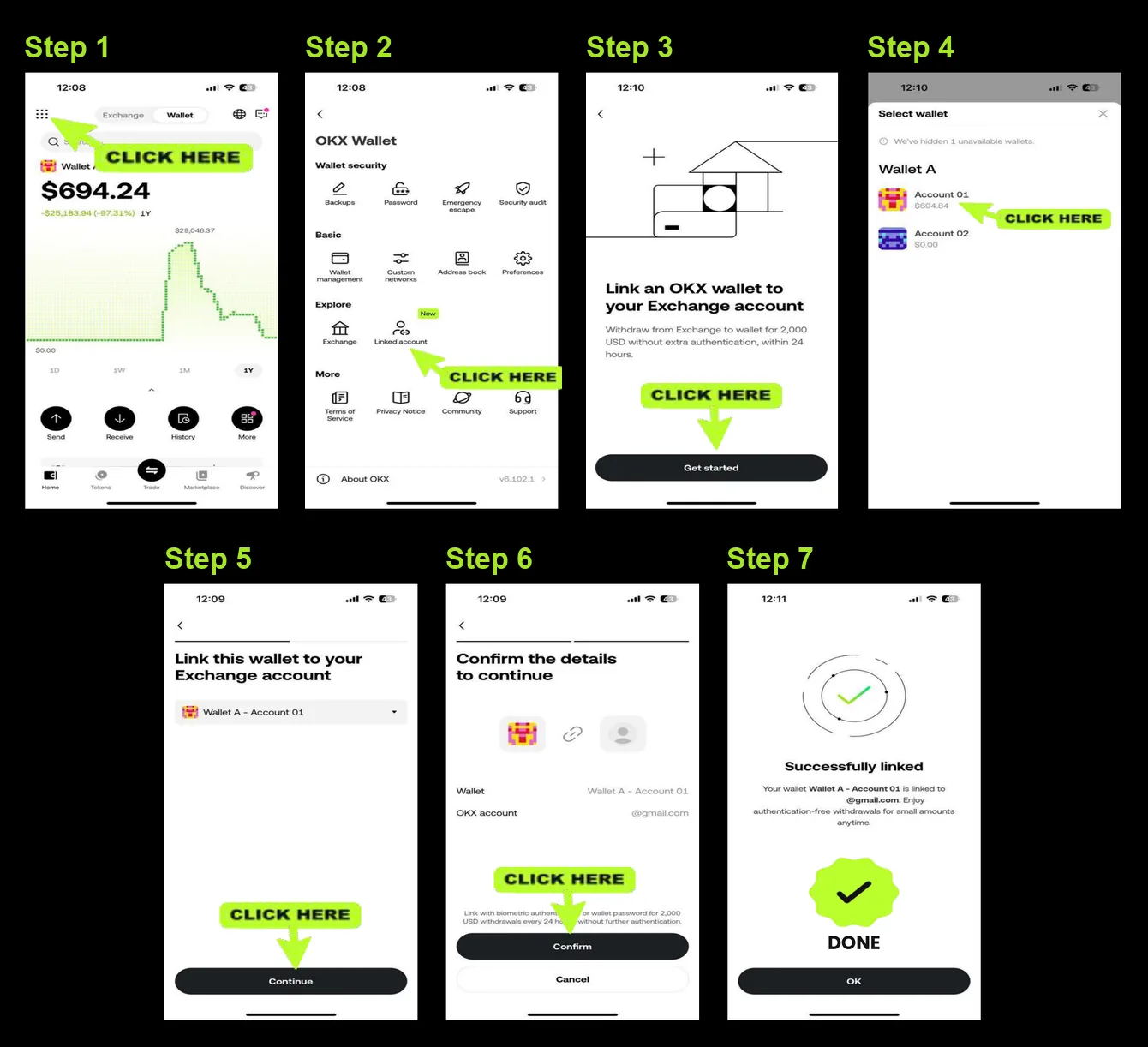
OKX says both options only appear once your wallet and exchange account are connected. The feature is called Wallet Connect (older guides call it a linked account). The rules, from OKX's Wallet Connect FAQ (updated August 2026):
To connect: open the menu (top left) > Account settings > Profile > Wallet Connect > Connect wallet, choose the wallet, enter the wallet password and finish verification. You need to be logged in to both the exchange account and the Web3 wallet. Our OKX Wallet settings checklist covers this screen too.
One more catch: OKX says the standalone OKX Wallet app does not support Quick Withdraw from Exchange Account. If you use that app, withdraw from the exchange side (Method 1), or copy your wallet's receiving address and paste it into a normal withdrawal.
OKX's rule is simple: the coin and the network must be the same on both sides. If you withdraw USDT on TRON, it arrives as USDT on TRON in your wallet. It is not on Ethereum or Solana.
So choose the network you actually plan to use in the wallet. If you want to trade on Solana, withdraw on Solana. Moving it between networks later means a bridge, an extra transaction and an extra fee.
Inside the wallet, every transaction pays a network fee in the chain's native coin. OKX's own example: to send USDT on TRON, you need TRX for the fee. If you only withdraw USDT, you can receive it but you cannot move or swap it until you add some TRX. On Ethereum you need ETH, on Solana you need SOL.
The easy fix is to withdraw a small amount of the native coin on the same network along with your tokens. Then you are ready to swap on OKX DEX or send funds elsewhere.
For trading, joining OKX Wallet through an invite link can give a 0–10% discount on DEX trading fees, depending on the code. Our OKX Wallet invite link is a referral link: we may earn part of the fee at no extra cost to you.
Going the other way? See how to send from OKX Wallet back to the exchange. For withdrawals to other platforms, see our OKX withdrawal guide.
No. It is an on-chain withdrawal, so the exchange charges a withdrawal fee for the coin and network you choose. The fee is shown on the withdrawal screen before you confirm.
Your wallet is probably not connected to your exchange account. Set up Wallet Connect under Account settings > Profile, or copy your wallet's receiving address and paste it as a normal withdrawal address.
No. OKX says the OKX Wallet app does not support Quick Withdraw from Exchange Account. Start the withdrawal from the OKX exchange app instead.
The one you plan to use in the wallet, and it must be supported by OKX Wallet. The coin arrives on the network you withdraw on, so a USDT withdrawal on TRON gives you USDT on TRON.
You need the network's native coin to pay gas: TRX on TRON, ETH on Ethereum, SOL on Solana. Withdraw a small amount of it to the same wallet address.
Self-custody wallet for 140+ networks, with a built-in DEX. Joining through our invite link gives a trading-fee discount on OKX DEX swaps.
Open OKX WalletReferral link: we may earn a share of DEX fees at no extra cost to you.