How to Find Your OKX Wallet Address on Any Network
Published October 30, 2026 · okxapk
Self-custody wallet for 140+ networks, with a built-in DEX. Joining through our invite link gives a trading-fee discount on OKX DEX swaps.
Open OKX WalletReferral link: we may earn a share of DEX fees at no extra cost to you.
To find your OKX Wallet address, open the wallet, tap Receive (or the copy icon next to your account), choose the crypto and the network, and copy the address or show its QR code. Your address depends on the network: one seed phrase gives you different addresses on Bitcoin, Solana and TRON, and one shared 0x address on EVM networks such as Ethereum and BNB Chain. Always copy the address for the exact network the sender will use.
| Where | Steps |
|---|---|
| OKX Wallet app | On the home page, tap the copy icon next to your account, or go to Crypto, pick the asset, then pick the network at the top. |
| OKX app (Web3 tab) | Select Web3 at the top, then tap the copy icon next to your account, or Receive > crypto > network. |
| Browser extension | Open the extension, select Receive, choose the crypto and network, then Copy. |
| OKX Wallet website | Portfolio > Portfolio > Crypto, select the network and crypto, tap the copy icon. Receive shows the QR code. |
These are the paths in OKX's help pages for the app (updated October 2026) and the website and extension (updated October 2026). Menu names can shift slightly between app versions.
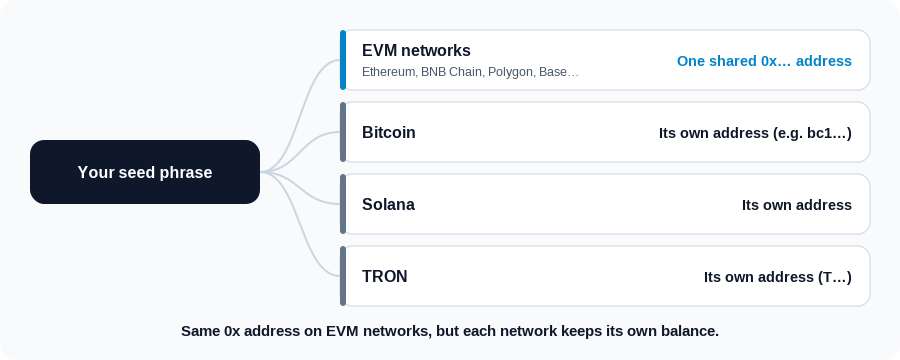
On EVM networks (Ethereum, BNB Chain, Polygon, Arbitrum, Base and others), OKX Wallet uses the same 0x address. That is convenient, but OKX warns that addresses which share a format across networks do not share balances (OKX help center, updated August 2026). USDT sent to your address on BNB Chain will not show up if you look on Ethereum.
On X Layer, OKX's own network, your address can be shown in two formats: the standard 0x EVM address and a new XKO-prefix address. According to OKX's X Layer FAQ (updated August 2026):
OKX says some networks, including TRON, Aptos and Sui, need a new address to receive a small amount of the network's main token before the address can send anything. Receiving only USDT does not activate a TRON address. Send a little TRX to it first, then you can move your USDT.
Your OKX Wallet address and your OKX exchange deposit address are not the same thing:
Moving between the two? See OKX exchange to Web3 wallet and OKX Wallet to exchange.
Once funds arrive, you can swap them in the wallet's built-in DEX. Joining OKX Wallet through an invite link can give a 0–10% discount on DEX trading fees, depending on the code. Our OKX Wallet invite link is a referral link: we may earn part of the fee at no extra cost to you.
Only on EVM networks, which share one 0x address. Bitcoin, Solana, TRON and other non-EVM networks each have their own address. Even when the address is the same, balances on different networks are separate.
Tap Receive, choose USDT, then choose the network (for example TRON or Ethereum). The address shown is your USDT address on that network.
Yes. On the OKX Wallet website you can add a watch-only wallet by address. It only shows assets and activity; you cannot send from it.
No. Memos and tags are used by exchanges, including the OKX exchange, to tell customer deposits apart. Your own wallet address does not use one.
Either works where XKO is supported, and OKX recommends XKO there. If the sending app or exchange does not support XKO yet, use the 0x address.
Self-custody wallet for 140+ networks, with a built-in DEX. Joining through our invite link gives a trading-fee discount on OKX DEX swaps.
Open OKX WalletReferral link: we may earn a share of DEX fees at no extra cost to you.